Read time: 2 minutes

This month saw the release of an updated provider block form for buyers and the addition of a 5 minute on the start of Arrival Window work orders. Click the table of contents on the side to explore each release’s details.
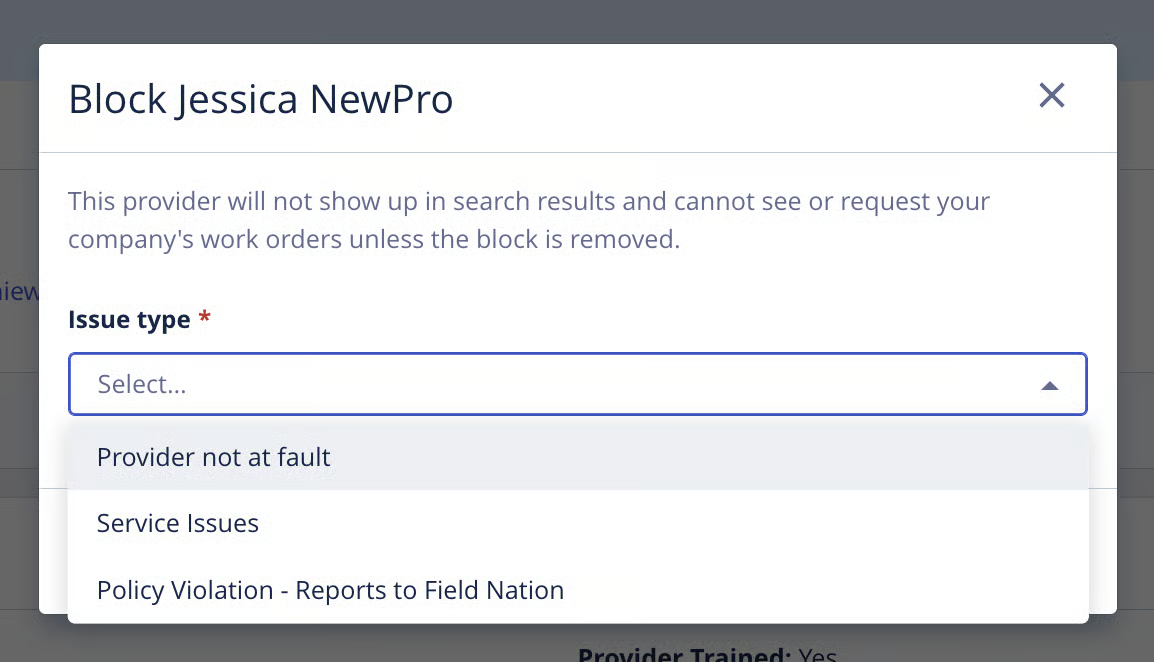
We’ve updated the provider block experience to make it easier to capture what happened and how much it affected your work.
The updated form gives buyers more specific issue options and, for certain issues, asks how significantly the experience affected their work. The updated form also includes block reasons that represent Report a User violations; if a buyer selects one of those reasons, they will be given an option to also report the user to Field Nation.
Lastly, to address situations where a provider is blocked based on a buyer’s recent experiences with them, potentially across multiple work orders, blocks may now factor into Buyer Satisfaction and PSS when the block is not tied to a specific work order, as long as there was a recent working relationship.
These updates make block information a more accurate input into Buyer Satisfaction and the Provider Success Score (PSS).
As a buyer, to learn more click here.
We’ve updated the definition of “On Time” for Arrival Windows by adding a 5-minute check-in buffer to the start of any work order with an Arrival Window schedule type. Previously, checking in any time before the start of an Arrival Window would be marked as “Early”, even if the provider was only a few minutes ahead of schedule.
For example, if an Arrival Window goes from 8:00 AM – 10:00 AM, any check-in between 7:55 AM to 10:00 AM will be marked “On Time.” Any check-in from 10:01 AM or later will still be marked as “Late”.
This small change gives providers more flexibility when arriving onsite, without changing the expectations for when work should begin.
As a provider, to learn more click here.